ParseJSON
| Release: |
• 4.6 • 5.0 • 5.1 • 5.2 • 5.3 • 5.4 • 6.0 • 6.1 • 6.2 • 6.3 • 6.4 • 6.5 • • 6.6 • 7.0 • 7.1 • 7.2 |
|---|
New to Analytica 5.0
ParseJSON( json, schema, flags )
Parses «json» text into Analytica data structures without using a schema. Usually, you will obtain the «json» text from a call to ReadFromUrl (a web-service call) or ReadTextFile.
JavaScript Object Notation (JSON) is a widely used lightweight data-interchange format. It is easy for humans and machines to read and write.
The Analytica data structures for the result, as well as the structure of the «schema», have changed in 7.0 to be much easier to use. If you load a model from an earlier release, a legacy parameter is added,
ParseJSON( json, Legacy: True )
which forces the older behavior for backward compatibility. To see that behavior, select 6.6 or earlier on the release bar at the top of this page.
Parameters
- «json»: A JSON-formatted text to parse.
- «schema»: (Optional) The identifier of a Struct object. If omitted, defaults to
_JSON. - «flags»: (optional) A bit field of flags that control various aspects of parsing. Bit settings are
- 1 = During schema-free parsing, create local indexes
.Dim1,.Dim2, ... for arrays. Without this, each level of an array is returned as a reference to a list.
- 1 = During schema-free parsing, create local indexes
The following parameters are deprecated, but will show up when a legacy model that uses ParseJSON is loaded into Analytica 7.0 or later (to preserve backward compatibility).
- «legacy»: (optional) Set to True to use the older, pre-7.0 data structures and «objectSchema».
- «objectSchema»: (optional) Used only for legacy models. Hidden parameter, but you might see it in a legacy model.
Parsing without a schema
The top-level item in a JSON text document should be a JSON object, for example:
Variable json1
Definition:
    '{ "title" : "1984",
       "author" : "George Orwell",
       "year" : 1949,
       "pages" : 336,
       "paperback" : true
     }'
Here is the result of parsing that JSON text without providing a schema:
ParseJSON(json1)→

This depicts an instance of the built-in Struct named _JSON. Double click on the «_JSON» cell to see its internals.

These members contain the data. If you save the result of ParseJSON(json1) in a variable named json1_parse1, you can access the values using, e.g.,
json1_parse1 -> author
which returns "George Orwell".
JSON with nested objects and no schema
With a JSON document containing nested objects, it creates local indexes at each level. To prevent the indexes from combining into a rectangular array, it places each member object in a reference.
Variable json2
Definition:
    '{ "title" : "1984",
       "author" : { "first" : "George", "last" : "Orwell" },
       "year" : 1949,
       "pages" : 336,
       "paperback" : true
     }'
- Variable parse2 :=
ParseJSON(json2) parse2→ (after clicking into the top «_JSON»):

and after double clicking the «_JSON» on 'author:

In other expression, you can now access the author's last name as
parse2->author->last
Reading JSON arrays
With no schema, ParseJSON does not map array data to existing indexes that you might have. There are two ways to read that depending on whether you set the «flags» parameter. By default, if you don't specify «flags», it returns arrays as lists and any nested array data to references to lists (to avoid having the implicit dimensions combine with other indexes).
Variable json3 :='{ "data": [ [ 1,2], [3,4], [5,6] ] }'Variable parse3 :=ParseJSON(json3)(after drilling down by double-clicking the «_JSON»):

The [...] indicates that the data member holds a list. Next, double click on the [...] to drill down further so see the contents of the list.

Each nested list becomes a reference to a list. This preserves the list structure of the JSON. The reference is necessary because Analytica doesn't allow lists of lists -- this would result in a multi-D array with more than one unnamed dimension. Drilling down into the second «ref» we see the list contents.

If you set used «flags» to 1, ParseJSON creates local indexes, named .Dim1, .Dim2, etc., for each nesting level in «json», and produces a multi-dimensional array without nesting.
Variable parse3b := ParseJSON(json3, flags:1)
parse3->data→

Parsing with a schema
A schema describes the data structure of a Java Script object, and the Structs and indexes in your model you want to map to.
JSON object schemas
The acceptable JSON structure and final representation is described by a Struct. The Parameter declarations determine which fields are allow, which data types are allowed in each field, how JSON lists map onto existing indexes, and which Structs are used for nested JSON objects. For example, consider this json2 data again:
    '{ "title" : "1984",
       "author" : { "first" : "George", "last" : "Orwell" },
       "year" : 1949,
       "pages" : 336,
       "paperback" : true
     }'
This JavaScript has a top-level object (Book) and a nested object (PersonName). We could use the following Struct to encode the schema:
Struct Book( title: text atom;
             author: Person atom ;
             year, pages: Number atom ;
             paperback : Boolean atom
)
Struct Person( first, last : Text atom )
- Variable parse4 ::=
ParseJSON( json2, Book ) &arr;

The result is now an instance of the Book struct instead of the generic _JSON struct. Double-click on «Book» to view the internals.
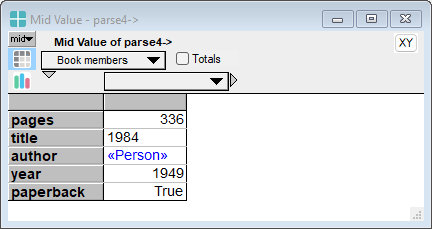

The author field is now an instance of the Person struct.
Member schema options
The following options can be used in a cell of an «objectSchema», each describing what is expected for the value of the corresponding member.
'atom'; The text 'atom' specifies that the data for that member shall not be an object or an array. It can be text (surrounded by double quotes), a number, or the keywords: null, true or false.Null: Any valid «json» is allowed, and the json appearing for that element is parsed without a schema.Handle(index): A handle to an index specifies that a JSON-object is expected, with member names that match the elements of «index». If a schema for that index appears in «objectSchema», that that schema guides the parsing. The result for this member will be a reference to a 1-D array indexed by «index».\ListOfHandles(I,J,K): A reference to a list of handles to indexes specifies that a JSON-array is expected here, and the indexes specify the indexes for the result, and the index order. The first index (i.e., «I») corresponds to the outermost index in the JSON array. When 2 or more indexes are listed, the final index can be either an array index or an object index. An object index is used when the «json» contains an array of objects.
Reading arrays with schema
The JSON standard expects the outermost object to be an object, so the schema always starts with the first «objectSchema». When a member contains an array, its schema should be a reference to a list of index handles containing the indexes for the result.
- Variable json3 :=
'{ "data" : [ [ 1,2], [3,4], [5,6] ] }'
- Index
J := [1, 2, 3]
- Index
K := ['k1', 'k2']
- Index D :=
['data']
- Variable D_Schema :=
Table(D)( \ListOfHandles( J,K ) )


In this example, the JSON contains an array of books, so each item in the JSON-array is a book object.
Variable json5
Definition:
'{ "bibliography" :
    [ { "title" : "1984",
        "author" : { "first" : "George", "last" : "Orwell" },
        "year" : 1949,
        "pages" : 336,
        "paperback" : true
       },
       { "title" : "The Time Machine",
          "author" : { "first" : "H. G.", "last" : "Wells" },
          "year" : 1895,
          "pages" : 118,
          "paperback" : true
       }
    ]
 }'
The schema for BookSchema has a reference to a list of handles, indicating that an array result is expected, and specifying the indexes for the result. The last index listed is an object with an «objectSchema» (i.e., Book, where BookSchema is provided), thus encoding that an array of book objects is expected.
- Index Biblio :=
['bibliography']
- Variable BookSchema :=
Table(Biblio)(\ListOfHandles(Book_Num, Book))
- Index Book_Num :=
1..2
- Variable parse5 :=
ParseJSON( json5, BiblioSchema, BookSchema, NameSchema )
#parse5[Biblio='bibliography'] →
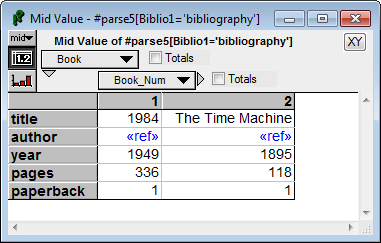

In this example, we had to know the number of books in advance. Your schema index(es)must be long enough to accommodate the data, or it will lose any data that doesn't fit. The index can be longer than needed, for example,
- Index Book_Num :=
1..1K
has space for one thousand books, even though only two appear in the «json». The excess slices along Book_Num contain Null. If you can't be sure that an index will be long enough, you should use schema-free parsing for that member -- i.e. put a Null in that member's schema.
See Also