Flatten
new to Analytica 5.0
| Release: |
• 4.6 • 5.0 • 5.1 • 5.2 • 5.3 • 5.4 • 6.0 • 6.1 • 6.2 • 6.3 • 6.4 • 6.5 • • 6.6 • 7.0 • 7.1 • 7.2 |
|---|
Flatten(x, I..., resultIndex, condition, map, includeNull)
Flattens the cells of a multi-dimensional array into a one-dimensional vector.
You should usually specify the indexes of «x» that you want to flatten over. For example, Flatten(x, In1, In2, In3) returns a one-dimensional array having the same values as the 3-dimensional array «x». The indexes listed first vary the slowest.
If you already have a result index, K for the final result, specify it by name using
Flatten(x, In1, In2, In3, resultIndex: K)
If you omit «resultIndex», a local index is created for you with the name .K. If your «resultIndex» is shorter than the number of cells, the flattened result is truncated, or if it is too long the result is null-padded.
Because a local index is created for the result, to define an index from the result of Flatten, you should surround it in CopyIndex(...).
If you omit «I» (the indexes to flatten), then all indexes of «x» are used, but you don't have explicit control over what order is used.
(New to Analytica 5.4) You can also specify an optional «condition» parameter to include only items in «x» that correspond to «condition» being true.
(New to Analytica 7.2) The optional «map» parameter turns Flatten into a general concatenate-lists function. When you pass a function to «map», it is called with one item of «x» at a time, and its result is what gets placed in the flattened result. When «map» returns a scalar, that value becomes one cell of the result. When it returns a list or a 1-D array, its elements are spliced into consecutive cells of the result. This makes it easy to concatenate lists that are nested within a data structure, such as an array of references to lists, or an array of Struct instances where a member of each instance holds a list.
«map» accepts a local (lambda) function, or the name of a User-Defined Function (including a Struct member function) that accepts one parameter. For example, to concatenate the lists in an array of references to lists:
Flatten(x, ...IndexesOf(x), map: (Function(ri : reference atom) ::= #ri))
or the lists held in a member of an array of Struct instances:
Flatten(x, ...IndexesOf(x), map: (Function(s : MyStruct atom) ::= s->a->theList))
or, when the Struct has a member function Items(Self) that returns the list:
Flatten(x, ...IndexesOf(x), map: MyStruct::Items)
When «map» is used, every index of «x» should be flattened. Any index of «x» that is not listed in «I» is handled by array abstraction, in which case the concatenations for the different slices are null-padded to the length of the longest one. The «condition», when given, is applied to the items of «x» before «map» is called.
Set the optional «includeNull» parameter to false to omit Null values from the result. Without «map», this omits the Null items of «x». With «map», it omits a Null result of «map», as well as any Null elements within a list that «map» returns. The default, includeNull: true, keeps Nulls in the result.
Examples
Applying a 1-D array-reducing function across multiple dimensions
Many array-reducing functions operate over one index and return a scalar result. For example, Median(a, I) computes the median of a data set along index I. Suppose you have a 2-D array, and you want the median value across both indexes. This is an example where you need to force a 1-D array-reducing function to operate over two or more indexes. This can be accomplished by flattening the array and then applying the array-reducing function.
A :=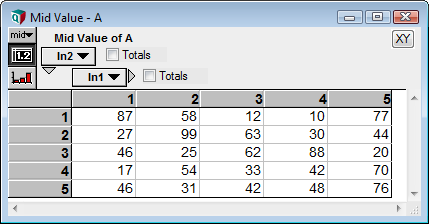

This method easily generalizes to more than two indexes, e.g., for four indexes:
To apply the reducing function over all indexes of the array, without knowing the number of indexes in advance, use Repeated parameter forwarding, e.g.,
Many built-in array-reducing functions (including Sum, Max, Min, Product, Average) already accept multiple indexes, making this technique unnecessary. With these you can just list the indexes to reduce over, e.g., Sum(A, In1, In2, In3).
Applying a 1-D transforming function across multiple dimensions
Situations sometime arise where you would like to apply an existing transforming function to a multidimensional array, such that the transformation should simultaneously operate over two or more indexes, but the existing function was created to operate over a single index. A transformation function is a function that takes an array as input, and produces an array having the same dimensions as the input.
One example is the Rank function, which operates over a single index. Suppose you want to apply it over 2 or more dimensions. You can do this by flattening the input array, applying Rank to the flattened 1-D result and then unflattening the result.
A :=

Notice that the smallest cell in the input has a rank of 1, and the largest value has a rank of 25.
The above example does a 2-D Rank calculation, and the same idea could be used for a 3-D (and so on) rank, e.g.,
This can be generalized to a User-Defined Function that works with any number of dimensions, by using Repeated parameter forwarding as follows.
Function RankMultiD( a : Array[I] ; I : ... index )- Definition:
Local b := Flatten( a, ...I ) Do Unflatten( Rank( b, b.K ), b.K, ...I )
You can use this function to compute Rank over three dimensions as
RankMultiD( A, In1, In2, In3 )
Or, you can use this to compute the rank over all indexes of A, without knowing in advance what they are, using Repeated parameter forwarding as
RankMultiD( A, ...IndexesOf(A) )
Customizing «resultIndex» labels
When you let the function create a local «resultIndex» for you, it defines the index elements as 1 to n. When you want the index to consist of some combination of the original source indexes, you should call Flatten twice, the first time to create the custom index labels, and the second time to flatten the values.
- Index Year :=
2017..2030 - Index Month :=
DatePart(MakeDate(2017,1..12),"MMM"){ This is['Jan', 'Feb', ..., 'Dec']} - Index BiMonthDay :=
[1,15]
We want to flatten Forecasted_price, but we want the index labels to be ['2017-Jan-1', '2017-Jan-15', '2017-Feb-1',...] and not just 1..24336. Note that this also gives you an opportunity to select the name for the local index. The use of CopyIndex here is unnecessary when defining a local index, but would be required in the Definition of a global index.
- LocalIndex FlatDate := CopyIndex( Flatten(Year & '-' & Month & '-' & BiMonthDay, Year, Month, ByMonthDay) );
- Flatten( Forecasted_price, Year, Month, BiMonthDay, K )
Concatenating lists nested in a data structure
(New to Analytica 7.2) Suppose R is indexed by I and each cell holds a reference to a list, for example
so that R[I = 3] is a reference to the list of multiples of 3. To concatenate all ten lists into one 1-D array (291 cells here), pass a function that dereferences each item to «map»:
Flatten(R, I, map: (Function(ri : reference atom) ::= #ri))
When an item of «x» dereferences to a scalar, that scalar occupies one cell of the result. When it dereferences to Null, a Null cell is included, or omitted if you pass includeNull: false.
The same pattern concatenates lists held inside Struct instances. If X is an array of MyStruct instances indexed by K, and the member function MyStruct::Items(Self) returns the list held by each instance, then
Flatten(X, K, map: MyStruct::Items)
or equivalently, with a local function that reaches into each instance directly,
Flatten(X, K, map: (Function(s : MyStruct atom) ::= s->a->b))
returns the concatenation of all the lists. Specify «resultIndex» when you already have an index for the result; as usual, the result is truncated or null-padded to its length.
History
- Introduced in Analytica 5.0.
- «map» and «includeNull» parameters added in Analytica 7.2.
See Also
- Unflatten
- Local Indexes
- ConcatRows( ) -- note: Flatten and ConcatRows are nearly identical in functionality when applied to a 2-D array «x».
- MdArrayToTable( ) -- also unflattens, but unlike Flatten, MdArrayToTable includes the coordinates of each cell in the result.
- Convert an Analytica multidimensional array into an Excel PivotTable